- How to Take Photos
Press the "📷/REC/> " to capture a photo, press one at a time.
- How to Zoom the Image While Recording
Press "🔎/∧ " to zoom in 2-3 times, press the 3rd time to return to normal (1).
- How to Delete Pictures or Videos
• Delete Pictures:
Press 🖼️ /< to enter picture and video select mode, press "∨" to select picture, and press " 📷/REC/> " to enter picture browsing mode, then Press " 🔎/∧ " or "∨" and " 📷/REC/> " to select the picture you want to delete, then press " M " and "∨" to select delete, press " 📷/REC/> " to enter Delete Current or Delete All options, press " 📷/REC/> " again to confirm, press "∨" to select OK.,press " 📷/REC/> " again to confirm delete.Finally, press the " 🖼️/< " to return to the previous menu.
• Delete Videos:
Press 🖼️ /< to enter picture and video select mode, press " 📷/REC/> " to enter video browsing mode, then Press " 🔎/∧ " or "∨" and " 📷/REC/> " to select the video you want to delete,then press " M " and "∨" to select delete, press " 📷/REC/> " to enter Delete Current or Delete All options, press " 📷/REC/> " again to confirm, press "∨" to select OK.,press " 📷/REC/> " again to confirm delete. Finally, press the " 🖼️/< " to return to the previous menu.
- How to Modify Video Length:(Default is 5 minutes)
The recorded video will be divided into fixed-length videos and stored in the memory card. You can adjust it up to 5 minutes. Press " M " and "∨" to select Loop Recording. Press 📷/REC/> and " 🔎/∧ " or "∨" to change it to off, 1min, 3mins or 5mins, press 📷/REC/> to confirm and press " M " to exit after setting.
- How to Set Recording without Audio
Long-press "∨" before recording video to select recording without audio.
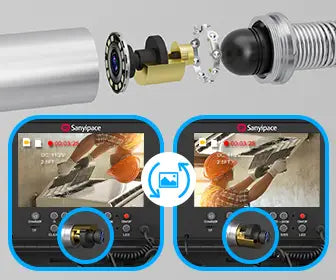
- How to Rotate the Screen Image
Press " M " to enter the menu, press "∨" select and press " 📷/REC/> " to enter the "Mirror", press " 📷/REC/> " to confirm On Mirror.
- How to Change the System Language
1. Press " M " to enter the menu and press " M " again to "System" sub-menu. Press "∨" to select system Language setting, and press " 📷/REC/> " to confirm.
- How to Format All Files
1. Press " M " to enter the menu and press " M " again to "System" sub-menu. Press "∨" to select system Format setting, and press " 📷/REC/> " to confirm. Press "∨" to select OK.,press " 📷/REC/> " again to confirm format.